Yes, it is true! You can get Microsoft Office Ultimate 2007 for as low as $64 Canadian.
How good of a deal is this? To buy Microsoft Office Professional at the Campus Store, it will cost you approximately $250. Office Professional includes the 2007 versions of Word, Excel, PowerPoint, Outlook, Access, Publisher, and Accounting Express. Office Ultimate includes the entire Professional bundle, but also includes InfoPath, Groove, and OneNote. To buy Office Ultimate 2007 at regular retail price, you could spend in excess of $900.
The Ultimate Steal offer ends 30 April 2008. Go to www.theultimatesteal.ca to check for pricing and qualifications.
Tuesday, December 11, 2007

Monday, December 3, 2007
Library Book Tree 2007
To celebrate the festive season, Library Services has setup its 3rd annual Library Book Tree.
The tree is trimmed with some traditional ornamentation, but with a little something extra. It is decorated with facsimiles of our faculty members', staff members', and students' favourite books.
Anyone can add their favourite title to the Library Book Tree with a $2 donation. All proceeds from this fund raising event will be donated to the Medicine Hat News' Santa Claus Fund.
See the Vera Bracken Library's Information Desk for more information and to donate.

The tree is trimmed with some traditional ornamentation, but with a little something extra. It is decorated with facsimiles of our faculty members', staff members', and students' favourite books.
Anyone can add their favourite title to the Library Book Tree with a $2 donation. All proceeds from this fund raising event will be donated to the Medicine Hat News' Santa Claus Fund.
See the Vera Bracken Library's Information Desk for more information and to donate.

Saturday, December 1, 2007
Library User of the Month - December 2007
Library Services is pleased to announce that Terry Chapman is our Library User of the Month for December 2007.
You can read a statement by Terry by clicking here.
You can read a statement by Terry by clicking here.
Friday, November 30, 2007
Student Appreciation Week Winners
Congratulations to our Student Appreciation Week daily prize draw winners. Each winner gets a $15 gift certificate to be spent at the Campus Store.
Our winners are:
Our winners are:
- Monday - Andrew Benoit
- Tuesday - Ian Wearmouth
- Wednesday - Abraham Chang
- Thursday - Tanya Myrfield
- Friday - Alex Schmidek
Thursday, November 29, 2007
You want more cow bell? We give you more cow bell!
In honour of Student Appreciation Week, one of the suggestions that we received was that we "need more cow bell." Being ones to never disappoint, we give you more cow bell!
Monday, November 26, 2007
Student Appreciation Week - November 26-30
 Join Library Services as we celebrate Student Appreciation Week in the Vera Bracken Library.
We will be holding daily draws for $15 gift certificates to the Campus Store. On Wednesday and Thursday, we will be offering free photocopying at the Vera Bracken Library's photocopy stations. So come in, enter the contests, and take advantage of our many services.
While you are here, take some time to tell us what you like about the Vera Bracken Library and offer suggestions on how we can improve our services to meet your needs. Our Comments/Suggestions box is located near the photocopier stations and is completely anonymous.
We look forward to serving you for the remainder of 2007 and into 2008.
Friday, November 23, 2007
Connecting to the Wireless Network - Keep It Simple
To connect to the wireless network in the Vera Bracken Library, you need to keep it simple. There is no special software, user name, or password required to access the wireless network.
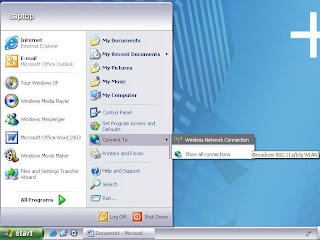
To begin, you only need to use the built-in Windows or Macintosh wireless connection application. To access the Windows software (see Figure 1), go to the Start button (on the task bar) > select: Connect To > click: Wireless Network Connection.
Figure 1. Opening the Wireless Network Connection application.
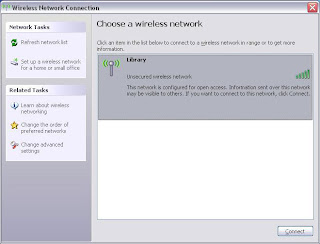
Once the Wireless Network Connection window opens (see Figure 2), be sure that you have selected the Library network, and click Connect to begin the connection process.
Figure 2. Selecting the desired wireless network.
To begin, you only need to use the built-in Windows or Macintosh wireless connection application. To access the Windows software (see Figure 1), go to the Start button (on the task bar) > select: Connect To > click: Wireless Network Connection.
Figure 1. Opening the Wireless Network Connection application.

Once the Wireless Network Connection window opens (see Figure 2), be sure that you have selected the Library network, and click Connect to begin the connection process.
Figure 2. Selecting the desired wireless network.

NOTE:
- If you have your machine set to automate your connection, you might make an ad hoc (peer-to-peer) connection. It will look like you are connected to a network, but you will not get any Web access - you have connected to another person's computer and not the wireless network.
- If you have your machine set to connect with a static Internet Protocol (IP) address, you might not be able to connect. Use dynamic IP addressing to connect to our wireless network - this is typically a system default setting.
- Neither Library Services nor Information Technology Services will modify/troubleshoot personal equipment. We suggest reviewing your owner's manual, contacting your computer's technical support line, or your computer's reseller for support with your wireless equipment.
Subscribe to:
Posts (Atom)